SharePoint Column Formatting: Show a Create Button or Open Folder Link
Overview
This post shows how to build a SharePoint column formatter that switches between a folder creation button and an open-folder link based on whether URL_Folder already contains a value.
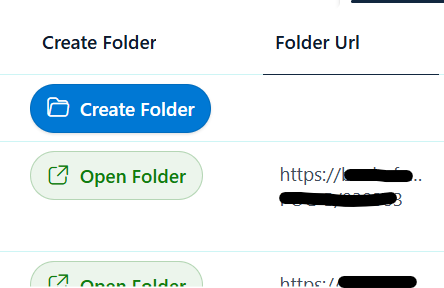
If URL_Folder is empty, users see a Create Folder button. Once the folder exists, the formatter replaces the button with an Open Folder link.
Why this helps
- Offers a clear action for new items
- Prevents the same action from appearing when the folder already exists
- Improves user experience with a single column-driven state
- Makes the row easier to scan by showing a transparent status-based UI
How it works
The formatter uses a parent div with two child elements:
- A
buttonthat is visible only whenURL_Folderis empty - An
alink that is visible only whenURL_Foldercontains a value
The key is the conditional display style:
=if([$URL_Folder]!='','none','flex')for the create button=if([$URL_Folder]=='','none','inline-flex')for the open link
Ready-to-use formatter
Use this JSON directly in your SharePoint column formatting settings.
{
  "$schema": "https://developer.microsoft.com/json-schemas/sp/v2/column-formatting.schema.json",
  "elmType": "div",
  "style": {
    "display": "flex",
    "align-items": "center"
  },
  "children": [
    {
      "elmType": "button",
      "customRowAction": {
        "action": "executeFlow",
        "actionParams": "{\"id\":\"v1/1e1eb60d-cbe5-4899-9f3e-4bc8c5906ed7/72003966-3250-400b-8f86-bdb2ca7d018e\", \"headerText\":\"Create Staff folder \",\"runFlowButtonText\":\"Create Staff Folder\"}"
      },
      "attributes": {
        "title": "Create Staff Folder",
        "aria-label": "Create Staff Folder"
      },
      "style": {
        "display": "=if([$URL_Folder]!='','none','flex')",
        "align-items": "center",
        "gap": "8px",
        "padding": "8px 12px",
        "border": "1px solid rgba(0,0,0,0.1)",
        "border-radius": "999px",
        "background-color": "#0078d4",
        "color": "#ffffff",
        "font-weight": "600",
        "cursor": "pointer",
        "box-shadow": "0 1px 2px rgba(0,0,0,0.12)",
        "outline": "none",
        "transition": "all 0.15s ease"
      },
      "children": [
        {
          "elmType": "span",
          "attributes": {
            "iconName": "FolderOpen"
          },
          "style": {
            "font-size": "16px",
            "line-height": "16px"
          }
        },
        {
          "elmType": "span",
          "txtContent": "Create Folder",
          "style": {
            "white-space": "nowrap"
          }
        }
      ],
      "hoverStyle": {
        "background-color": "#106ebe",
        "border": "1px solid rgba(0,0,0,0.15)",
        "box-shadow": "0 2px 6px rgba(0,0,0,0.18)"
      }
    },
    {
      "elmType": "a",
      "attributes": {
        "href": "[$URL_Folder]",
        "target": "_blank",
        "title": "Open Folder"
      },
      "style": {
        "display": "=if([$URL_Folder]=='','none','inline-flex')",
        "align-items": "center",
        "gap": "8px",
        "padding": "8px 12px",
        "border": "1px solid rgba(16, 124, 16, 0.25)",
        "border-radius": "999px",
        "background-color": "rgba(16, 124, 16, 0.08)",
        "color": "#107c10",
        "font-weight": "600",
        "text-decoration": "none",
        "white-space": "nowrap",
        "cursor": "pointer"
      },
      "children": [
        {
          "elmType": "span",
          "attributes": {
            "iconName": "OpenInNewWindow"
          },
          "style": {
            "font-size": "16px",
            "line-height": "16px"
          }
        },
        {
          "elmType": "span",
          "txtContent": "Open Folder"
        }
      ],
      "hoverStyle": {
        "background-color": "rgba(16, 124, 16, 0.14)",
        "border": "1px solid rgba(16, 124, 16, 0.35)"
      }
    }
  ]
}
Notes
URL_Foldermust contain a valid URL string or a hyperlink field that resolves as text.- If your
URL_Foldercolumn is a SharePoint Hyperlink field and the link does not open, try using a calculated text field that extracts the URL instead. - Update the Flow
idand button labels to match your own process.
Next steps
- Add a second conditional state for a “Folder missing” warning if the item is in an invalid state.
- Use a custom column name such as
FolderActionto separate UI behavior from raw metadata. - Extend the formatter with an icon-only button for a cleaner compact layout.