Shared channels permissions synchronisation to SharePoint
Permissions for shared channels should be managed from Teams and the channel itself, not by manually changing permissions on the underlying SharePoint site.
That said, the background synchronisation between Teams shared channels and SharePoint can occasionally fail. When that happens, users who are correctly listed as channel owners or members may still be unable to search, open, or work with the content stored in the connected SharePoint site.
I ran into this after a migration that involved large-scale membership updates. Although the channel membership changes completed successfully, the matching SharePoint permissions did not fully catch up. Users started reporting that they could no longer access documents in shared channel sites, which made it clear that permissions were no longer synchronised.
To understand the scale of the issue, I first created a script to count mismatches between Teams channel membership and SharePoint site membership. That quickly highlighted more than 100 affected sites and roughly 4,000 permission discrepancies.
The operational impact was significant: hundreds of users across hundreds of channels and sites were left without access to their content. At that point I needed a practical way to assess the blast radius and restore access while the root cause was still unclear.
The incident quickly became difficult to manage. The migration scripts that updated shared channel membership completed successfully, which raised the question of whether Teams and SharePoint were being throttled differently behind the scenes. With so many channels, sites, and users affected, I needed a fast way to measure the scope of the problem and identify where permissions had fallen out of sync.
Because the issue appeared to be in the backend synchronisation process, only Microsoft had visibility into the service-level telemetry needed to confirm the root cause. Even though the ticket was raised as a Sev A incident, progress was slow. The case moved between multiple SharePoint and Teams support engineers, many of whom focused on standard guidance about not changing permissions directly in SharePoint rather than on the scale and urgency of the outage.
The support experience itself became part of the challenge. Engineers changed across shifts, key escalation steps depended on waiting for affected users to become available, and several hours passed without meaningful progress. In the meantime, I had to focus on practical recovery options, including building an unsupported script to add missing channel users to the SharePoint site so access could be restored while the wider issue was still under investigation.
PowerShell to get a count of permission discrepancies
$dateTime = (Get-Date).toString("dd-MM-yyyy_HHmm")
$invocation = (Get-Variable MyInvocation).Value
$directorypath = Split-Path $invocation.MyCommand.Path
$fileName = "ChannelsSharePointPermissions-" + $dateTime + ".csv"
$OutPutView = $directorypath + "\Logs\"+ $fileName

$CertPassword = Read-Host "Please enter Certificate Password:" -AsSecureString
$TenantUrl = "https://contoso.sharepoint.com"
$TenantName = $TenantUrl.Split('/')[2].Split('.')[0]
$CertPath = "C:\Users\xx\ReshmeeCertPnP.pfx"
$csvSitesPath =  Read-Host "Enter path to CSV file"
$clientId = "xxx"
# Array to Hold Result - PSObjects
$teamsChannelsCollection = @()

$sites = Import-Csv -Path $csvSitesPath | Where-Object Exclude -ne 'Yes'

$adminconnection = Connect-PnPOnline -ClientId $clientId -CertificatePath $CertPath -CertificatePassword $CertPassword -Url $TenantUrl -Tenant "$($TenantName).onmicrosoft.com" -ValidateConnection -ReturnConnection

foreach ($site in $sites) {
   $siteUrl = $site.SiteUrl;
   $owners=  Get-PnPTeamsChannelUser -Team $site.Team -Channel $site.Channel -Role Owner -Connection $adminconnection
   $ownersls= ($owners | select-object -ExpandProperty DisplayName) -join ";"
   $members = Get-PnPTeamsChannelUser -Team $site.Team -Channel $site.Channel -Role Member -Connection $adminconnection
   $membersls= ($members | select-object -ExpandProperty DisplayName) -join ";"

   $siteChannel =  Get-PnPTenantSite -Detailed -Identity $siteUrl -Connection $adminconnection
   $groupId = $siteChannel.GroupId;
   $siteconnection = Connect-PnPOnline -ClientId $clientId -CertificatePath $CertPath -CertificatePassword $CertPassword -Url $siteUrl -Tenant "$($TenantName).onmicrosoft.com" -ValidateConnection -ReturnConnection

   $ownersGroup = Get-PnPGroup -AssociatedOwnerGroup -Connection $siteConnection -ErrorAction Stop
   $membersGroup = Get-PnPGroup -AssociatedMemberGroup -Connection $siteConnection -ErrorAction Stop

   $siteowners = Get-PnPGroupMember -Group $ownersGroup -Connection $siteconnection
   $sitemembers = Get-PnPGroupMember -Group $membersGroup -Connection $siteconnection

   $siteownersls= ($siteowners | select-object -ExpandProperty Title) -join ";"
   $sitemembersls= ($sitemembers | select-object -ExpandProperty Title) -join ";"
   if ($groupId -ne [System.Guid]::Empty)
    {
     $siteowners = Get-PnPMicrosoft365GroupOwner -Identity $groupId -ErrorAction Ignore -Connection $siteConnection
     $sitemembers = Get-PnPMicrosoft365GroupMember -Identity $groupId  -ErrorAction Ignore -Connection $siteConnection

     $siteownersls= ($siteowners | select-object -ExpandProperty DisplayName) -join ";"
     $sitemembersls= ($sitemembers | select-object -ExpandProperty DisplayName) -join ";"
    }


   $outOfSync = If(($owners.Count -ne $siteowners.Count) -or ($members.Count -ne ($sitemembers.Count - $siteowners.Count) )) {"Yes"} else {"No"}

   $NumberOutOfSync = ($owners.Count - $siteowners.Count) + ($members.Count - ($sitemembers.Count - $siteowners.Count) )

   $ExportVw = New-Object PSObject
   $ExportVw | Add-Member -MemberType NoteProperty -name "Site URL" -value $siteUrl
   $ExportVw | Add-Member -MemberType NoteProperty -name "Teams" -value $site.Team
   $ExportVw | Add-Member -MemberType NoteProperty -name "Channel" -value $site.Channel
   $ExportVw | Add-Member -MemberType NoteProperty -name "Channel Owners Count" -value $owners.Count
   $ExportVw | Add-Member -MemberType NoteProperty -name "Channel Owners" -value $ownersls
   $ExportVw | Add-Member -MemberType NoteProperty -name "Channel Members Count" -value $members.Count
   $ExportVw | Add-Member -MemberType NoteProperty -name "Channel Members" -value $membersls

   $ExportVw | Add-Member -MemberType NoteProperty -name "SharePoint Members" -value $sitemembersls
   $ExportVw | Add-Member -MemberType NoteProperty -name "SharePoint Members Count" -value $sitemembers.Count
   $ExportVw | Add-Member -MemberType NoteProperty -name "SharePoint Owners" -value $siteownersls
   $ExportVw | Add-Member -MemberType NoteProperty -name "SharePoint Owners Count" -value $siteowners.Count
   $ExportVw | Add-Member -MemberType NoteProperty -name "Membership out of synch" -value $outofsync
   $ExportVw | Add-Member -MemberType NoteProperty -name "Membership Count out of synch" -value $NumberOutOfSync

   $teamsChannelsCollection += $ExportVw

 }

$teamsChannelsCollection | sort-object "Site Url" |Export-CSV $OutPutView -Force -NoTypeInformation
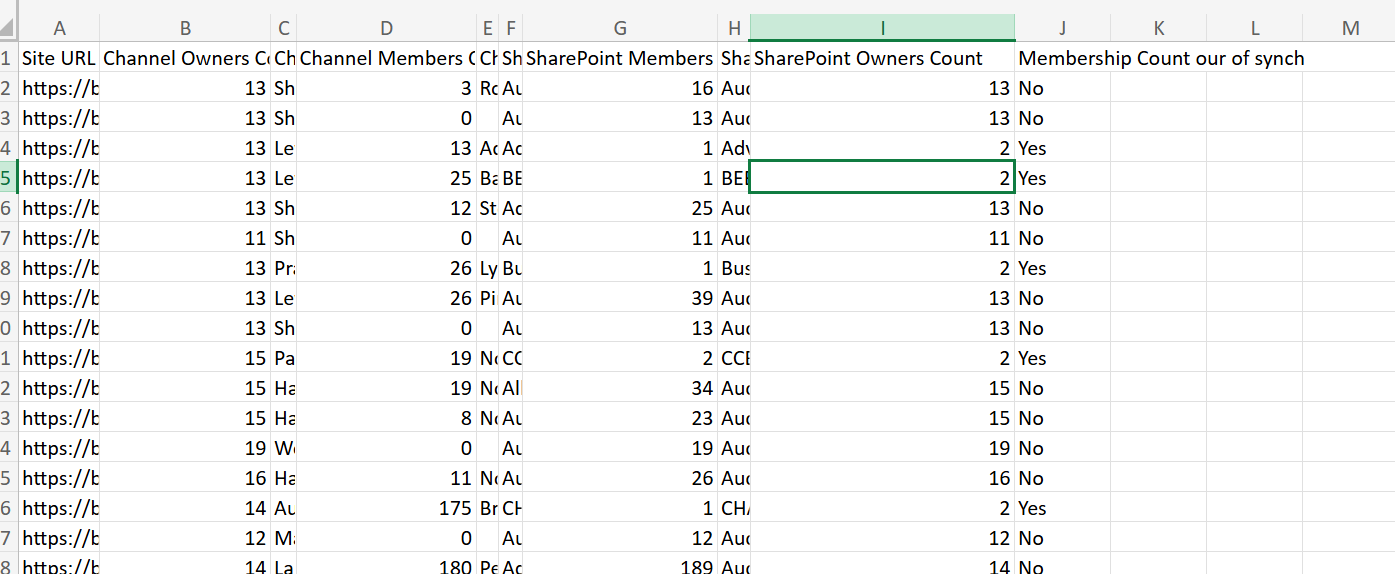
Report format
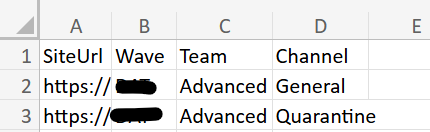
csv file input
csv inpt file containing the columns Team, Channel and SiteUrl
PowerShell to get detailed missing users
After running the recovery script to add users back to the SharePoint site, I still needed a way to monitor any remaining discrepancies. That led to the second script below, which reports users who are still missing from the SharePoint site compared with the Teams shared channel membership.
In my case, the remaining gaps were limited to inactive users. Those accounts do not appear in the Teams UI, which also suggests that inactive users can remain associated with Teams channels.
$dateTime = Get-Date -Format "dd-MM-yyyy_HHmm"

$invocation = (Get-Variable MyInvocation).Value
$directoryPath = Split-Path $invocation.MyCommand.Path
$logsPath = Join-Path $directoryPath "Logs"

if (-not (Test-Path $logsPath)) {
    New-Item -Path $logsPath -ItemType Directory -Force | Out-Null
}

$fileName = "ChannelsSharePointPermissions-$dateTime.csv"
$outputView = Join-Path $logsPath $fileName

$CertPassword = Read-Host "Please enter Certificate Password:" -AsSecureString

# Important: use the plain URL, not the HTML anchor copied from Teams/Outlook.
$TenantUrl = "https://contoso.sharepoint.com"
$TenantName = $TenantUrl.Split('/')[2].Split('.')[0]

$CertPath = "C:\Users\xx\ReshmeeCertPnP.pfx"
$csvSitesPath = Read-Host "Enter path to CSV file"
$clientId = "xxx"

$teamsChannelsCollection = @()

function Get-NormalisedUserIdentity {
    [CmdletBinding()]
    param(
        [Parameter(Mandatory, ValueFromPipeline)]
        $User
    )

    process {
        $identity = $null

        # Teams channel user properties
        if ($User.Email) {
            $identity = $User.Email
        }
        elseif ($User.Mail) {
            $identity = $User.Mail
        }
        elseif ($User.UserPrincipalName) {
            $identity = $User.UserPrincipalName
        }

        # SharePoint or Microsoft 365 group properties
        elseif ($User.LoginName) {
            $identity = $User.LoginName
        }

        if ([string]::IsNullOrEmpty($identity)) {
            return $null
        }

        # Convert a SharePoint claims login such as
        # i:0#.f|membership|user@domain.com
        # into user@domain.com
        if ($identity -match '\|') {
            $identity = ($identity -split '\|')[-1]
        }

        $identity.Trim().ToLowerInvariant()
    }
}

function Get-UserDisplayValue {
    [CmdletBinding()]
    param(
        [Parameter(Mandatory, ValueFromPipeline)]
        $User
    )

    process {
        $identity = Get-NormalisedUserIdentity -User $User

        if (-not [string]::IsNullOrEmpty($identity)) {
            return $identity
        }

        if ($User.DisplayName) {
            return $User.DisplayName
        }

        if ($User.Title) {
            return $User.Title
        }

        return "Unknown user"
    }
}

$sites = Import-Csv -Path $csvSitesPath |
    Where-Object { $_.Exclude -ne "Yes" }

$adminConnection = Connect-PnPOnline -ClientId $clientId -CertificatePath $CertPath -CertificatePassword $CertPassword -Url $TenantUrl -Tenant "$TenantName.onmicrosoft.com" -ValidateConnection -ReturnConnection

foreach ($site in $sites) {
    $siteUrl = $site.SiteUrl
    Write-Host "Checking Team '$($site.Team)', channel '$($site.Channel)'..."  -ForegroundColor Cyan
    try {
        # Channel membership is the source of truth.
        $owners = @(
            Get-PnPTeamsChannelUser `
                -Team $site.Team `
                -Channel $site.Channel `
                -Role Owner `
                -Connection $adminConnection `
                -ErrorAction Stop
        )

        $members = @(
            Get-PnPTeamsChannelUser `
                -Team $site.Team `
                -Channel $site.Channel `
                -Role Member `
                -Connection $adminConnection `
                -ErrorAction Stop
        )

        $siteChannel = Get-PnPTenantSite `
            -Detailed `
            -Identity $siteUrl `
            -Connection $adminConnection `
            -ErrorAction Stop

        $groupId = $siteChannel.GroupId

        $siteConnection = Connect-PnPOnline `
            -ClientId $clientId `
            -CertificatePath $CertPath `
            -CertificatePassword $CertPassword `
            -Url $siteUrl `
            -Tenant "$TenantName.onmicrosoft.com" `
            -ValidateConnection `
            -ReturnConnection

        $ownersGroup = Get-PnPGroup `
            -AssociatedOwnerGroup `
            -Connection $siteConnection `
            -ErrorAction Stop

        $membersGroup = Get-PnPGroup `
            -AssociatedMemberGroup `
            -Connection $siteConnection `
            -ErrorAction Stop

        # For shared/private channel sites, these SharePoint groups will normally
        # be used when the site is not backed by a Microsoft 365 group.
        $siteOwners = @(
            Get-PnPGroupMember `
                -Group $ownersGroup `
                -Connection $siteConnection `
                -ErrorAction Stop
        )

        $siteMembers = @(
            Get-PnPGroupMember `
                -Group $membersGroup `
                -Connection $siteConnection `
                -ErrorAction Stop
        )

        $siteMembershipSource = "SharePoint groups"

        # Retain support for group-connected sites in the input report.
        if (
            $null -ne $groupId -and
            $groupId -ne [System.Guid]::Empty
        ) {
            $siteOwners = @(
                Get-PnPMicrosoft365GroupOwner `
                    -Identity $groupId `
                    -Connection $siteConnection `
                    -ErrorAction Stop
            )

            $siteMembers = @(
                Get-PnPMicrosoft365GroupMember `
                    -Identity $groupId `
                    -Connection $siteConnection `
                    -ErrorAction Stop
            )

            $siteMembershipSource = "Microsoft 365 group"
        }

        # Build case-insensitive identity lookup sets.
        $siteOwnerIdentitySet = [System.Collections.Generic.HashSet[string]]::new(
            [System.StringComparer]::OrdinalIgnoreCase
        )

        $siteMemberIdentitySet = [System.Collections.Generic.HashSet[string]]::new(
            [System.StringComparer]::OrdinalIgnoreCase
        )

        # Build a combined set of everyone currently present in the channel.
        # Owners and members are combined to avoid incorrectly flagging a channel
        # owner who also appears in the SharePoint Members group.
        $channelIdentitySet = [System.Collections.Generic.HashSet[string]]::new(
            [System.StringComparer]::OrdinalIgnoreCase
        )

        $channelOwnerIdentitySet = [System.Collections.Generic.HashSet[string]]::new(
            [System.StringComparer]::OrdinalIgnoreCase
        )

        $channelMemberIdentitySet = [System.Collections.Generic.HashSet[string]]::new(
            [System.StringComparer]::OrdinalIgnoreCase
        )

        foreach ($channelOwner in $owners) {
            $identity = Get-NormalisedUserIdentity -User $channelOwner

            if (-not [string]::IsNullOrEmpty($identity)) {
                [void]$channelOwnerIdentitySet.Add($identity)
                [void]$channelIdentitySet.Add($identity)
            }
        }

        foreach ($channelMember in $members) {
            $identity = Get-NormalisedUserIdentity -User $channelMember

            if (-not [string]::IsNullOrEmpty($identity)) {
                [void]$channelMemberIdentitySet.Add($identity)
                [void]$channelIdentitySet.Add($identity)
            }
        }

        foreach ($siteOwner in $siteOwners) {
            $identity = Get-NormalisedUserIdentity -User $siteOwner

            if (-not [string]::IsNullOrEmpty($identity)) {
                [void]$siteOwnerIdentitySet.Add($identity)
            }
        }

        foreach ($siteMember in $siteMembers) {
            $identity = Get-NormalisedUserIdentity -User $siteMember

            if (-not [string]::IsNullOrEmpty($identity)) {
                [void]$siteMemberIdentitySet.Add($identity)
            }
        }

        # Identify users who exist in the channel but are missing from SharePoint.
        $missingOwners = @(
            foreach ($channelOwner in $owners) {
                $identity = Get-NormalisedUserIdentity -User $channelOwner

                if (
                    -not [string]::IsNullOrEmpty($identity) -and
                    -not $siteOwnerIdentitySet.Contains($identity)
                ) {
                    $channelOwner
                }
            }
        )

        $missingMembers = @(
            foreach ($channelMember in $members) {
                $identity = Get-NormalisedUserIdentity -User $channelMember

                if (
                    -not [string]::IsNullOrEmpty($identity) -and
                    -not $siteMemberIdentitySet.Contains($identity)
                ) {
                    $channelMember
                }
            }
        )

        # Identify SharePoint owners who no longer exist anywhere in the channel.
        $additionalSharePointOwners = @(
            foreach ($siteOwner in $siteOwners) {
                $identity = Get-NormalisedUserIdentity -User $siteOwner

                if (
                    -not [string]::IsNullOrEmpty($identity) -and
                    -not $channelIdentitySet.Contains($identity)
                ) {
                    $siteOwner
                }
            }
        )

        # Identify SharePoint members who no longer exist anywhere in the channel.
        $additionalSharePointMembers = @(
            foreach ($siteMember in $siteMembers) {
                $identity = Get-NormalisedUserIdentity -User $siteMember

                if (
                    -not [string]::IsNullOrEmpty($identity) -and
                    -not $channelIdentitySet.Contains($identity)
                ) {
                    $siteMember
                }
            }
        )

        $additionalSharePointOwnerValues = @(
            $additionalSharePointOwners |
                ForEach-Object {
                    Get-UserDisplayValue -User $_
                }
        )

        $additionalSharePointMemberValues = @(
            $additionalSharePointMembers |
                ForEach-Object {
                    Get-UserDisplayValue -User $_
                }
        )

        $missingOwnerValues = @(
            $missingOwners |
                ForEach-Object { Get-UserDisplayValue -User $_ }
        )

        $missingMemberValues = @(
            $missingMembers |
                ForEach-Object { Get-UserDisplayValue -User $_ }
        )

        $channelOwnerValues = @(
            $owners |
                ForEach-Object { Get-UserDisplayValue -User $_ }
        )

        $channelMemberValues = @(
            $members |
                ForEach-Object { Get-UserDisplayValue -User $_ }
        )

        $siteOwnerValues = @(
            $siteOwners |
                ForEach-Object { Get-UserDisplayValue -User $_ }
        )

        $siteMemberValues = @(
            $siteMembers |
                ForEach-Object { Get-UserDisplayValue -User $_ }
        )

        $outOfSync = if ($missingOwners.Count -gt 0 -or $missingMembers.Count -gt 0 -or $additionalSharePointOwners.Count -gt 0 -or $additionalSharePointMembers.Count -gt 0
        ) {
            "Yes"
        }
        else {
            "No"
        }

        $numberOutOfSync = $missingOwners.Count + $missingMembers.Count + $additionalSharePointOwners.Count + $additionalSharePointMembers.Count
        if ($outOfSync -eq "Yes") {
          Write-Warning (
            "Membership mismatch found for '$siteUrl'. " +
            "Missing SharePoint owners: $($missingOwners.Count); " +
            "Missing SharePoint members: $($missingMembers.Count); " +
            "Additional SharePoint owners: $($additionalSharePointOwners.Count); " +
            "Additional SharePoint members: $($additionalSharePointMembers.Count)"
            )
        }

        $exportView = [PSCustomObject]@{
            "Site URL"                       = $siteUrl
            "Teams"                          = $site.Team
            "Channel"                        = $site.Channel
            "SharePoint Membership Source"   = $siteMembershipSource

            "Channel Owners Count"            = $owners.Count
            "Channel Owners"                  = $channelOwnerValues -join ";"

            "Channel Members Count"           = $members.Count
            "Channel Members"                 = $channelMemberValues -join ";"

            "SharePoint Owners Count"         = $siteOwners.Count
            "SharePoint Owners"               = $siteOwnerValues -join ";"

            "SharePoint Members Count"        = $siteMembers.Count
            "SharePoint Members"              = $siteMemberValues -join ";"

            "Missing SharePoint Owners Count" = $missingOwners.Count
            "Missing SharePoint Owners"       = $missingOwnerValues -join ";"

            "Missing SharePoint Members Count" = $missingMembers.Count
            "Missing SharePoint Members"       = $missingMemberValues -join ";"

            "Additional SharePoint Owners Count" = $additionalSharePointOwners.Count
            "Additional SharePoint Owners"       = $additionalSharePointOwnerValues -join ";"

            "Additional SharePoint Members Count" = $additionalSharePointMembers.Count
            "Additional SharePoint Members"       = $additionalSharePointMemberValues -join ";"
            "Membership out of sync"          = $outOfSync
            "Membership Count out of sync"    = $numberOutOfSync
            "Status"                          = "Success"
            "Error"                           = $null
        }

        $teamsChannelsCollection += $exportView
    }
    catch {
        Write-Warning "Failed to process '$siteUrl': $($_.Exception.Message)"

        $teamsChannelsCollection += [PSCustomObject]@{
            "Site URL"                        = $siteUrl
            "Teams"                           = $site.Team
            "Channel"                         = $site.Channel
            "SharePoint Membership Source"    = $null
            "Channel Owners Count"             = $null
            "Channel Owners"                   = $null
            "Channel Members Count"            = $null
            "Channel Members"                  = $null
            "SharePoint Owners Count"          = $null
            "SharePoint Owners"                = $null
            "SharePoint Members Count"         = $null
            "SharePoint Members"               = $null
            "Missing SharePoint Owners Count"  = $null
            "Missing SharePoint Owners"        = $null
            "Missing SharePoint Members Count" = $null
            "Missing SharePoint Members"       = $null
            "Additional SharePoint Owners Count"  = $null
            "Additional SharePoint Owners"        = $null
            "Additional SharePoint Members Count" = $null
            "Additional SharePoint Members"       = $null
            "Membership out of sync"           = "Unknown"
            "Membership Count out of sync"     = $null
            "Status"                           = "Failed"
            "Error"                            = $_.Exception.Message
        }
    }
}

$teamsChannelsCollection |
    Sort-Object "Site URL" |
    Export-Csv `
        -Path $outputView `
        -Force `
        -NoTypeInformation `
        -Encoding UTF8

Write-Host "Report exported to: $outputView" -ForegroundColor Green
Report Output

Force Sync users
This was a temporary recovery script used while the investigation was still in progress and users were actively impacted to restore access. I asked Microsoft if there were any side effects of running the script but seems to be none.
$dateTime = (Get-Date).toString("dd-MM-yyyy-HHmm")
$invocation = (Get-Variable MyInvocation).Value
$directorypath = Split-Path $invocation.MyCommand.Path
$fileName = "ChannelsSharePointPermissions-" + $dateTime + ".csv"
$OutPutView = $directorypath + "\Logs\"+ $fileName

$CertPassword = Read-Host "Please enter Certificate Password:" -AsSecureString
$TenantUrl = "https://contoso.sharepoint.com"
$TenantName = $TenantUrl.Split('/')[2].Split('.')[0]
$CertPath = "C:\Users\xx\ReshmeeCertPnP.pfx"
$csvSitesPath =  Read-Host "Enter path to CSV file"
$clientId = "xxx"
# Array to Hold Result - PSObjects
$teamsChannelsCollection = @()
#Write-host $"$ownerName not part of member in $siteUrl";
#$m365Sites = Get-PnPTenantSite -Detailed | Where-Object {($_.Url -like '*/TEST-*'-or $_.Template -eq 'TEAMCHANNEL#1') -and $_.Template -ne 'RedirectSite#0' }
#$m365Sites | ForEach-Object {
$sites = Import-Csv -Path $csvSitesPath | Where-Object Exclude -ne 'Yes'
$adminconnection = Connect-PnPOnline -ClientId $clientId -CertificatePath $CertPath -CertificatePassword $CertPassword -Url $TenantUrl -Tenant "$($TenantName).onmicrosoft.com" -ValidateConnection -ReturnConnection

foreach ($site in $sites) {

    $siteUrl = $site.SiteUrl;
   $owners=  Get-PnPTeamsChannelUser -Team $site.Team -Channel $site.Channel -Role Owner -Connection $adminconnection
   $ownersls= ($owners | select-object -ExpandProperty DisplayName) -join ";"
   $members = Get-PnPTeamsChannelUser -Team $site.Team -Channel $site.Channel -Role Member -Connection $adminconnection
   $membersls= ($members | select-object -ExpandProperty DisplayName) -join ";"


   $siteChannel =  Get-PnPTenantSite -Detailed -Identity $siteUrl -Connection $adminconnection
   $groupId = $siteChannel.GroupId;
   $siteconnection = Connect-PnPOnline -ClientId $clientId -CertificatePath $CertPath -CertificatePassword $CertPassword -Url $siteUrl -Tenant "$($TenantName).onmicrosoft.com" -ValidateConnection -ReturnConnection

   $ownersGroup = Get-PnPGroup -AssociatedOwnerGroup -Connection $siteConnection -ErrorAction Stop
   $membersGroup = Get-PnPGroup -AssociatedMemberGroup -Connection $siteConnection -ErrorAction Stop

   $siteowners = Get-PnPGroupMember -Group $ownersGroup -Connection $siteconnection
   $sitemembers = Get-PnPGroupMember -Group $membersGroup -Connection $siteconnection

   $siteownersls= ($siteowners | select-object -ExpandProperty Title) -join ";"
   $sitemembersls= ($sitemembers | select-object -ExpandProperty Title) -join ";"
   if ($groupId -ne [System.Guid]::Empty)
    {
     $siteowners = Get-PnPMicrosoft365GroupOwner -Identity $groupId -ErrorAction Ignore -Connection $siteConnection
     $sitemembers = Get-PnPMicrosoft365GroupMember -Identity $groupId  -ErrorAction Ignore -Connection $siteConnection

     $siteownersls= ($siteowners | select-object -ExpandProperty DisplayName) -join ";"
     $sitemembersls= ($sitemembers | select-object -ExpandProperty DisplayName) -join ";"
    }

   foreach($channelOwner in $Owners)
   {
##Process only channel sites
    if ($groupId -eq [System.Guid]::Empty)
    {
      #if not present in site owners
      $emailo = $channelOwner.Email
      $existingOwner = $siteowners | Where-Object {$_.Email -eq $emailo}
      if(!$existingOwner){
        try {
         Add-PnPGroupMember -LoginName $emailo -Group $ownersGroup -Connection $siteconnection
         Write-host "$emailo has been added as owner in $siteUrl";
         $ExportVw = New-Object PSObject
         $ExportVw | Add-Member -MemberType NoteProperty -name "Site URL" -value $siteUrl
         $ExportVw | Add-Member -MemberType NoteProperty -name "Teams" -value $site.Team
         $ExportVw | Add-Member -MemberType NoteProperty -name "Channel" -value $site.Channel
         $ExportVw | Add-Member -MemberType NoteProperty -name "Channel user added to SharePoint as Owner" -value $emailo
         $ExportVw | Add-Member -MemberType NoteProperty -name "Channel user added to SharePoint as Member" -value ""
         $teamsChannelsCollection += $ExportVw
        }
        catch {
         Write-host "$emailo has not been added as owner in $siteUrl : $_";            <#Do this if a terminating exception happens#>
        }
      }
    }
   }

   foreach($channelMember in $members)
   {
      #if not present in site owners
      $emailm = $channelMember.Email
      $existingMember = $sitemembers | Where-Object {$_.Email -eq $emailm}
      if(!$existingMember){
         try {
        Add-PnPGroupMember -LoginName $emailm -Group $membersGroup -Connection $siteconnection

         $ExportVw = New-Object PSObject
         $ExportVw | Add-Member -MemberType NoteProperty -name "Site URL" -value $siteUrl
         $ExportVw | Add-Member -MemberType NoteProperty -name "Teams" -value $site.Team
         $ExportVw | Add-Member -MemberType NoteProperty -name "Channel" -value $site.Channel
         $ExportVw | Add-Member -MemberType NoteProperty -name "Channel user added to SharePoint as Member" -value $emailm
         $ExportVw | Add-Member -MemberType NoteProperty -name "Channel user added to SharePoint as Owner" -value ""
         $teamsChannelsCollection += $ExportVw
         }
         catch {

         Write-host "$emailm has not been added as member in $siteUrl : $_";            <#Do this if a terminating exception happens#>
         }

      }
   }
}
# Export the result array to CSV file
$teamsChannelsCollection | sort-object "Site Url" |Export-CSV $OutPutView -Force -NoTypeInformation
Conclusion
In this case, the root cause was SharePoint API throttling during a period of very high channel membership change activity, with around 10,000 permission updates submitted in a short time window. That throttling disrupted the expected synchronisation between Teams shared channels and the connected SharePoint sites.
Microsoft eventually triggered backend full synchronisation events across the affected scope, which allowed the SharePoint user-provisioning operations to complete successfully. The remediation restored approximately 94.6% of the outstanding permission gap, and the remaining discrepancies were largely limited to disabled Entra ID accounts that would not be granted SharePoint access anyway.
The practical lesson is that, during large migrations or bulk membership updates, it is worth validating that shared channel membership has fully synchronised to SharePoint rather than assuming the background process has completed successfully. Having a lightweight reporting script, and a carefully controlled recovery option if needed, can significantly reduce the impact on users while the underlying issue is being investigated.