Power Automate: Add term to a term set
This post shows how to create a term in a SharePoint taxonomy term set using Power Automate and the SharePoint REST API v2.1. It is useful when you want to automate adding a managed metadata term based on your scenario.
What you need
- A SharePoint site with either site level or tenant level term store
- The term group ID for the site-level or tenant level term group
- The term set ID for the destination term set
- A Power Automate flow trigger such as item-created or manual trigger
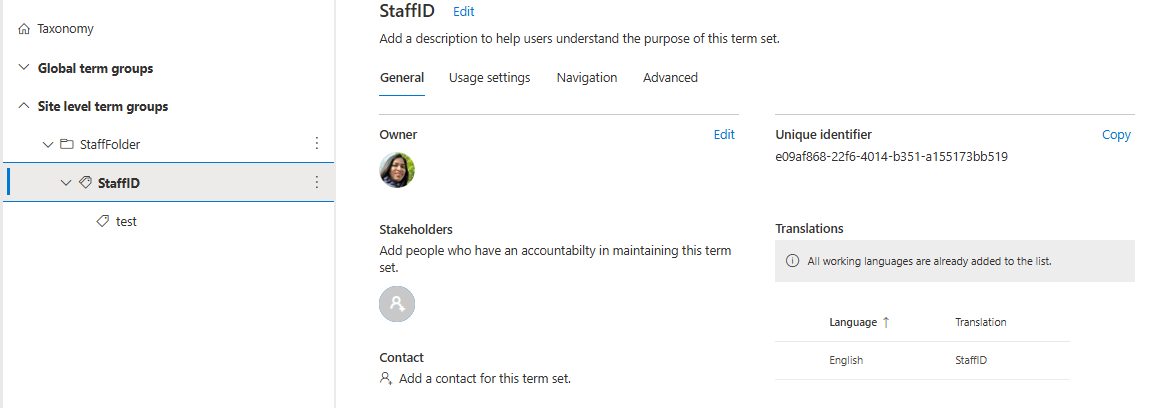
Step 1: Get the term group and term set IDs
- In SharePoint, go to
Site Settings>Term Store Management. - Select the term group that contains your target term set.
- Copy the term group ID.

- Expand the term group and select the target term set.
- Copy the term set ID.
Step 2: Build the flow
Start with a trigger that matches your scenario. For testing, use a Manually trigger a flow action. Later you can switch to When an item is created or When an item is created or modified.
Then add the Send an HTTP request to SharePoint action.
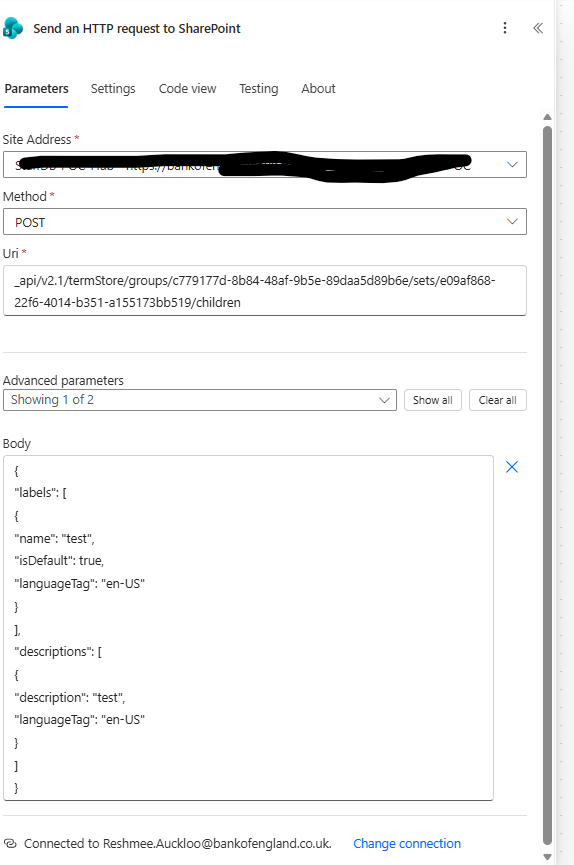
Step 3: Configure the HTTP request
Use the SharePoint v2.1 REST API endpoint for term store operations. The v1.0 endpoint can fail for taxonomy writes.
- Site Address:
<Your SharePoint URL> - Method:
POST - Uri:
_api/v2.1/termStore/groups/<termGroupId>/sets/<termSetId>/children
Request body example
{
  "labels": [
    {
      "name": "test",
      "isDefault": true,
      "languageTag": "en-US"
    }
  ],
  "descriptions": [
    {
      "description": "test",
      "languageTag": "en-US"
    }
  ]
}
Replace the sample values with the actual term name, language tag, and description you want to create.
Step 4: Test and verify
- Save the flow.
- Run the trigger and confirm the HTTP request action succeeds.
- Verify the new term appears in the target term set.
If the action fails, check:
- the term group ID and term set ID are correct
- the REST API URI uses v2.1 and the correct path
- the flow user has permission to write to the term store
Notes
- Use v2.1 for taxonomy term creation.
- Test first with a manual trigger before moving to an automated flow.
References
How To Create Term In Term Store Using Power Automate